Chemistry & Temperature · Tool 01
Mixture and Concentration Calculator
About this calculator
Preparing a working solution isn't a big deal—until you have two stock solutions of different concentrations sitting on the table. This mixing calculator helps you prepare a solution with the desired concentration from them. You can also calculate the other way around: What concentration will result from the amounts you already have?
It's important to me that the calculation remains transparent. That's why you see both the initial quantities and the final concentration listed together. First, choose the appropriate type of concentration: volume percent and mass percent describe different things and cannot simply be interchanged.
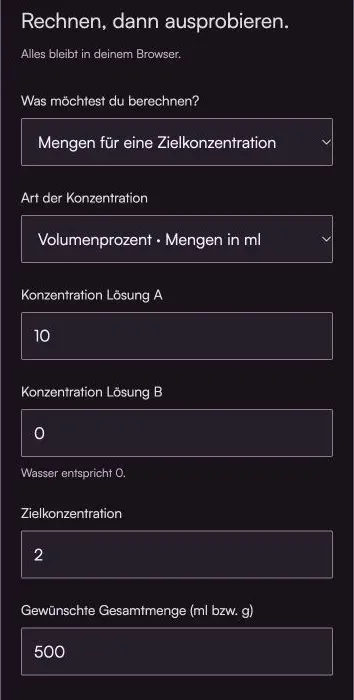
Do the math, then give it a try.
Everything stays in your browser.The calculator is loading …
Your result
100% / Select "Actual Size." Turn off headers and footers. Then check the 100-mm distance with a ruler.
How to Use the Calculator
- Select the calculation method and the concentration type. All concentrations must use the same unit.
- Enter the concentrations of solutions A and B. Pure water used for dilution has a concentration of zero.
- Enter the target concentration and total amount, or the individual amounts available. Use grams for mass percent; otherwise, use milliliters.
What's Behind the Bill
Amount A = Total amount × (Target − Concentration B) / (Concentration A − Concentration B)
The calculation is based on a material balance: The dissolved substances present in the two solutions must still be present after mixing. In the second mode, this results in a quantity-weighted average. Simply calculating the average without taking the quantities into account would be incorrect.
When calculating volumes, the calculator assumes that the volumes add up. This works well as a working model for many dilute solutions. However, some mixtures contract, react with each other, or heat up. For a precise laboratory preparation to the mark, therefore, the appropriate procedure and the actual final volume must be used.
An example to work through
To make 500 ml of a 2% solution from a 10% solution and water, you'll need 100 ml of solution A and 400 ml of water. In the "Given Quantities" mode, you'll get a 2% solution again using the same values.
Here's what you should keep in mind
- A target concentration outside the range of the two initial concentrations cannot be achieved by mixing alone.
- When the initial concentrations are equal, the ratio of the quantities cannot be determined unambiguously. The calculator indicates this.
- There are no instructions for safely mixing unknown chemicals: Compatibility and the sequence of operations must be determined in advance.
Frequently Asked Questions (FAQ)
How do I calculate the mixture of two solutions with different concentrations?
Enter both initial concentrations, the desired target concentration, and the total volume. The calculator distributes the volumes so that the mass balance is correct. For example, to make 500 mL of a 2% solution from a 10% solution and water, you would need 100 mL of the stock solution and 400 mL of water. When specifying volumes, an additive mixture is assumed.
Can I use mass percent and volume percent interchangeably?
No, not directly. Mass percent refers to mass, while volume percent refers to volume. Choose the same type of concentration for both initial solutions. Converting between grams and milliliters also requires the appropriate density; the calculator does not perform this conversion.
Why can't I focus on my target?
When mixing, the target concentration must lie between the two initial concentrations. Without further processing, mixing 5% and 10% will result in neither 2% nor 15%. If the initial concentrations are identical, the final concentration will also remain the same; in this case, a definite ratio cannot be determined.
Read More & Sources
If you'd like to learn more about the basics, you'll find helpful explanations here.