Exposure & Large Format · Tool 05
ND and Reciprocity Calculator for Film
About this calculator
An ND filter mathematically extends the exposure time by a fixed factor. With analog film, the reciprocity error often comes into play at long exposure times. While it is possible to calculate both factors one after the other on a piece of paper, this tool keeps the two steps clearly separate.
You can calculate just the filter, just the film correction, or both together. Profiles are available for ILFORD and Kentmere, Kodak TRI-X and T-MAX, FUJIFILM ACROS II, and FOMAPAN 100, 200, and 400. Each film uses its own manufacturer specifications. A custom exponent remains available for sources that explicitly specify a power model in seconds.
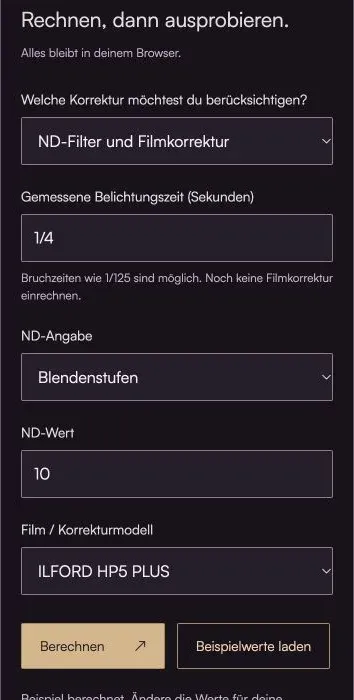
Do the math, then give it a try.
Everything stays in your browser.The calculator is loading …
Your result
100% / Select "Actual Size." Turn off headers and footers. Then check the 100-mm distance with a ruler.
How to Use the Calculator
- Enter the measured start time in seconds or as a fraction, for example, 1/4. It must not yet include any reciprocity correction.
- Choose the ND unit carefully: f-stops, optical density, and extension factor are different specifications.
- If necessary, select the film. The result shows the exposure time after applying the ND filter, followed by the corrected exposure time or the required aperture setting. If an aperture recommendation is provided, the displayed exposure time after applying the ND filter remains unchanged.
What's Behind the Bill
Time with ND = exposure time × 2^f-stops; ILFORD power model for times greater than 1 s: corrected time = ND time^P
The order is crucial: First, the filter’s light transmission is taken into account. Only then is the film profile applied to the resulting long exposure time. The ILFORD profiles in this calculator do not require any additional correction for exposures up to and including one second.
An optical density of 3.0 corresponds to a factor of 1,000. Ten full stops, on the other hand, correspond to 1,024. In everyday use, these terms are often used interchangeably; mathematically, however, they are not identical. Here, they are calculated according to their chosen unit.
Reciprocity correction affects more than just brightness. During very long exposures, contrast and image quality can change. Light metering, filter tolerance, and fluctuating ambient light remain additional sources of uncertainty.
Why not use the same formula for every movie?
According to the manufacturer, a measured 10 seconds becomes 80 seconds for FOMAPAN 100, 90 seconds for FOMAPAN 200, and 60 seconds for FOMAPAN 400. This cannot be meaningfully replaced by an exponent adopted from ILFORD. The calculator uses a double logarithmic interpolation between the time reference values. This is a noted approximation, not a formula verified by the manufacturer. The table profiles extend up to 100 seconds of uncorrected time after ND; outside these limits, the calculator does not calculate an estimated value.
In some cases, Kodak specifies only an aperture value for T-MAX. FUJIFILM also recommends adding half a f-stop for ACROS II at exposure times ranging from 120 to 1,000 seconds. These profiles therefore show the required aperture value for a given exposure time. Such a recommendation is not automatically converted into a longer exposure time: particularly when it comes to the reciprocity law error, the two approaches are not interchangeable at will. If there is no leeway with the aperture, you’ll need a proven exposure time correction for your film.
I’ve also checked ORWO. The UN54 datasheet linked from the manufacturer’s website does not include a correction table for long exposures. That’s why there isn’t an automatic ORWO profile available yet. An unsubstantiated number wouldn’t be helpful, especially for complex shots. Furthermore, for other ORWO films, one cannot simply assume they use the UN54 emulsion.
An example to work through
1/4 second and a 10-stop ND filter initially add up to 256 seconds. With HP5 PLUS and P = 1.31, this becomes approximately 1,429 seconds—or just under 24 minutes.
Here's what you should keep in mind
- ILFORD/Kentmere use a power model. TRI-X and Foma use time-based values; T-MAX and ACROS II provide an aperture correction here. Intermediate values are approximations, where indicated.
- Do not adjust times that have already been adjusted. If no film profile is available, only the ND extension is explicitly applied.
- Color shifts in color film and spectral filter effects are not taken into account.
Frequently Asked Questions (FAQ)
Should I calculate the ND filter or the Schwarzschild effect first?
First, the measured time is extended by the ND factor. The film-specific reciprocity correction is then applied to this extended time. A film time that has already been corrected must not be corrected again. The calculator displays the two results separately.
Are ND 3.0, ND 1000, and ten stops exactly the same thing?
Not exactly. An optical density of 3.0 corresponds to a factor of 1,000; ten full stops correspond to 2 to the power of 10, or a factor of 1,024. Filter designations are not always consistent. Select the unit actually intended in the calculator and check the manufacturer’s specifications.
At what exposure time do I need to take the Schwarzschild effect into account?
That depends on the film. For the ILFORD exposure profiles listed here, no correction is applied up to and including one second; beyond that, the extended exposure time is calculated using the respective exponent. This limit is not a universal rule: Foma specifies corrections already above half a second, whereas ACROS II does so only starting at 120 seconds. The relevant data sheet is always the determining factor.
Can I use the same reciprocity factor for every film?
No. The deviation is specific to the film and may be specified as a power model or as a table. A separate exponent is appropriate here only if the source explicitly uses the model “corrected seconds = measured seconds to the power of P.” A table cannot simply be replaced by a single exponent.
Do I need film correction even with a digital camera?
This film-specific correction is not used for a digital sensor. Select the “ND Filter Only” mode. However, other issues—such as noise or overheating—may still occur during long digital exposures; these are not addressed by the film profiles used here.
Why aren't long exposures always exactly right, even when the exposure time has been calculated?
This calculation assumes an appropriate initial exposure and the correct film profile. Filter tolerances, changing light conditions, and—in the case of film—changes in contrast can affect the result. For important subjects, it is advisable to take a bracketed series of exposures. Additionally, the calculator does not correct for color casts caused by a filter or color film.
Why does T-MAX or ACROS II display an aperture setting instead of a new exposure time?
Manufacturers specify aperture corrections for these profiles, sometimes without a corrected exposure time at certain support points. Keep the shutter speed as it is after applying the ND filter and adjust the aperture as specified. A blanket conversion to a longer shutter speed would not be reliable due to the reciprocity failure. Shutter speed and aperture corrections must not be applied twice.
What happens if my exposure time is outside the range specified in the film data?
For limited table profiles and ACROS II, the calculator displays a clear message instead of an estimated film time. The limits refer to the uncorrected time after the ND filter. For example, 256 seconds after the ND filter are already outside the Foma and Kodak tables stored here, even though the measured initial exposure time may be short. In that case, select only the ND calculation and determine the film correction using an appropriate manufacturer’s recommendation or your own test shots.
Read More & Sources
If you'd like to learn more about the basics, you'll find helpful explanations here.
- ILFORD: Film Reciprocity Failure Compensation (PDF)
- ILFORD: Technical Data Sheets
- Wikipedia: Schwarzschild effect
- Schneider-Kreuznach: The Effect of Neutral Density Filters
- Kodak: TRI-X 320 and 400, F-4017 (PDF)
- Kodak: T-MAX 100, F-4016 (PDF)
- Kodak: T-MAX 400, F-4043 (PDF)
- FUJIFILM: ACROS II, Data Sheet 120 (Japanese, PDF)
- Foma: FOMAPAN 100 Classic
- Foma: FOMAPAN 200 Creative
- Foma: FOMAPAN 400 Action
- ORWO/Filmotec: UN54, Technical Information (PDF)