Formats & Image Data · Tool 11
Comparison of Film Formats, Angles of View, and Focal Lengths
About this calculator
What focal length on a 4 × 5-inch format is roughly equivalent to my 35mm lens? A single crop factor provides only part of the answer. As soon as the aspect ratios differ, the horizontal and vertical angles of view do not match at the same time.
This comparison therefore illustrates three perspectives: horizontal, vertical, and diagonal. The format graphic shows the image windows side by side at the same scale. This makes it easier to see why a focal length that is similar in theory can still result in a different frame.
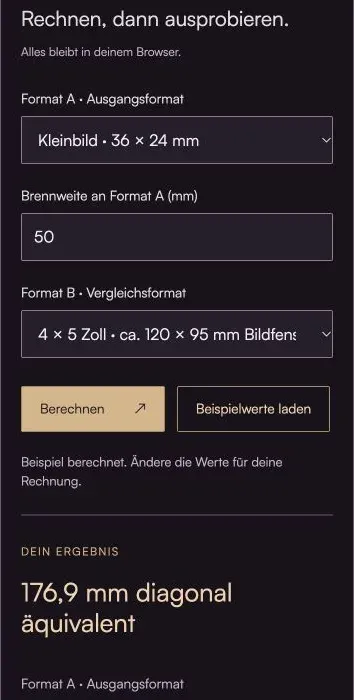
Do the math, then give it a try.
Everything stays in your browser.The calculator is loading …
Your result
100% / Select "Actual Size." Turn off headers and footers. Then check the 100-mm distance with a ruler.
How to Use the Calculator
- Select output format A and its focal length.
- Select comparison format B. You can enter custom image window dimensions for both formats.
- Compare the diagonal equivalence with the horizontal and vertical values. Make your decision based on the desired crop.
What's Behind the Bill
Field of view = 2 × arctan(image size / (2 × focal length)); equivalent focal length B = focal length A × image size B / image size A
The width, height, or diagonal can be used as the image dimension. Only when the aspect ratio is the same will all three comparisons yield the same focal length factor. When comparing a square format to a rectangular one, it is impossible to achieve a perfect match without cropping.
The specifications for medium format and sheet film refer to typical image windows, not the exact external dimensions of the film stock. Cameras and film holders may differ from these specifications. If an exact crop is required, use the actual exposed area.
This calculation applies to rectilinear lenses at infinity. A fisheye lens uses a different projection; close-up focusing and distortion are also not taken into account. Furthermore, focal length equivalence does not indicate the size of a specific lens’s image circle.
Your vantage point determines your perspective. A different focal length while keeping the camera in the same position initially changes the frame. Only when you move the camera do the spatial proportions change.
An example to work through
50 mm on 35 mm film (36 × 24 mm) corresponds to approximately 177 mm diagonally on a 120 × 95 mm image window. Horizontally, it would be about 167 mm, and vertically, about 198 mm.
Here's what you should keep in mind
- No calculation of depth of field, image circle, or adjustment range.
- The graphic shows formats; it is not a simulated image or lens rendering.
Frequently Asked Questions (FAQ)
Does the crop factor change the actual focal length of my lens?
No. The crop factor describes a comparison of the captured image area across different camera formats. A 50-mm lens remains a 50-mm lens. On a smaller image sensor, it captures a narrower angle; the equivalent focal length refers to the comparable angle of view on a different format.
Why do horizontal, vertical, and diagonal focal length equivalents differ?
When aspect ratios differ, the width, height, and diagonal do not change in the same proportion. Therefore, a single equivalent focal length cannot match all three angles of view at the same time. Choose the appropriate reference for your intended frame, or take the necessary cropping into account.
Will I get the same perspective and depth of field with an equivalent focal length?
Not automatically. The perspective depends on the viewpoint and the distances to the subject. The comparison of focal lengths here applies only to the angle of view. Depth of field, aperture, pupil scale, and image circle are not converted into a comprehensive image equivalence.
When using the Planfilm feature, should I enter the film's external dimensions or the image window?
Use the actual exposed image area for the angle of view. The film's external dimensions and trade name may differ from this. The preset dimensions are typical approximations; for a specific holder or a particular camera, you can enter the measured image area dimensions yourself.
Read More & Sources
If you'd like to learn more about the basics, you'll find helpful explanations here.